Mise - Case Study
This post contains the reasoning I used to decide the tech stack for this Mise.
The Challenge
Candelari's has a vital mission: deliver an authentic Italian experience to people in Houston. To accomplish this, they need efficient inventory and order management.
They needed a comprehensive technology program to improve inventory management, employee training, communication between managers and kitchens, and ordering between the commissary and restaurant locations. As an expanding business, critical improvements were required to accommodate growing pains.
Disclaimer
The app is behind a login wall, so I cannot link to it publicly. See the documentation I wrote for a detailed breakdown:
Deciding the Tech Stack
Candelari's is expanding, so their needs are in constant flux. The tech stack needed to be nimble to adapt to a growing business, and reliable to deliver a professional user experience. Mise brings these qualities together.
Database
I had two considerations: what type of database to use, and where to host it.
- Choosing a Database:
-
SQL
- Pros 👍🏼:
- The app is heavily relational, making SQL a natural choice.
- Combined with Prisma, I get compile-time type safety between my database and application code, increasing reliability. (SQL alone has data types but no compile-time guarantees—Prisma bridges that gap.)
- Relational constraints enforce data integrity at the database level.
- Pros 👍🏼:
-
NoSQL
- Pros 👍🏼:
- No schema required, staying nimble.
- Cons 👎🏼:
- No schema often leads to less reliable data.
- Less reliable data means more bugs, which burns time.
- Pros 👍🏼:
- Choose a Cloud Provider (Heroku, Railway, Render, PlanetScale).
-
I considered PlanetScale for its version control features, but it felt like overkill for this project's scale.
-
Railway was the easiest to set up with reasonable costs. I spun up Postgres staging and production instances in less than 5 minutes.
-
I went with PostgreSQL on Railway—it satisfied both reliable and nimble requirements.
Limitation acknowledged: Railway is excellent for rapid development, but for a truly production-critical system, managed PostgreSQL services (AWS RDS, Supabase, Neon) offer better reliability guarantees like automated backups, point-in-time recovery, and read replicas. For Mise's current scale and budget, Railway was the right trade-off.
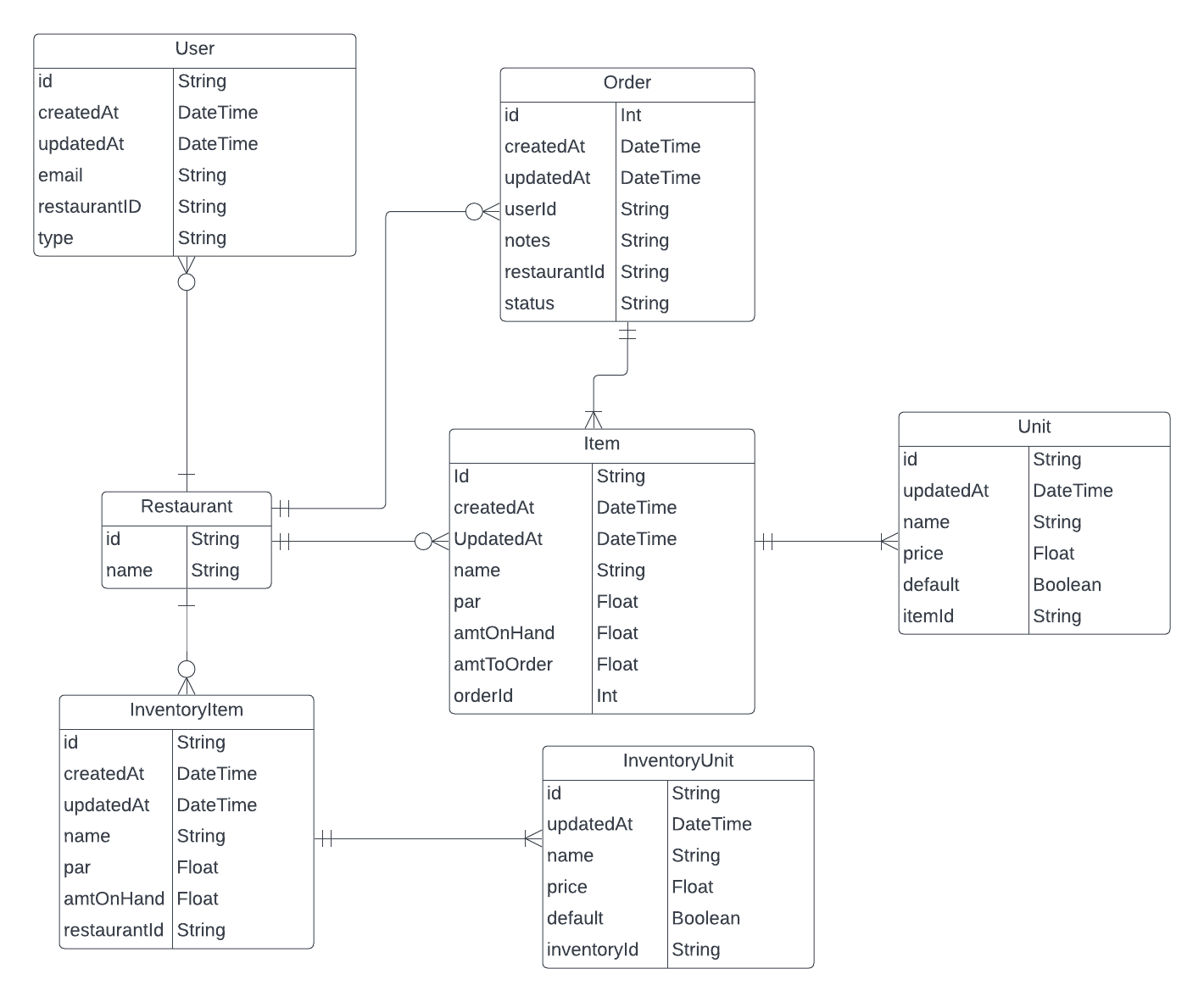
The database schema:
Backend
I needed a safe way to call my backend from the frontend. With typed data, my components know exactly what to expect, increasing reliability. It also keeps things nimble—I can maneuver in the frontend without worrying about breaking anything.
REST, GraphQL, and tRPC were all candidates. tRPC was the best fit for this project. Here are the trade-offs I considered:
GraphQL
- Pros 👍🏼:
- Type-safe frontend-backend calls (via GraphQL Code Generator).
- Establishes a contract between frontend and backend.
- Suited for public-facing APIs.
- Solves over-fetching issues.
- Language-agnostic.
- Cons 👎🏼:
- More complex mental model.
- Relies on code generation for type safety.
- Harder to migrate away from.
REST
- Pros 👍🏼:
- Type-safe frontend-backend calls (via Swagger).
- Language-agnostic.
- Suited for public-facing APIs.
- Simpler mental model—just create endpoints as needed.
- Easy to migrate away from.
- Cons 👎🏼:
- Relies on code generation for type safety.
tRPC
- Pros 👍🏼:
- Type-safe frontend-backend calls.
- Automatic TypeScript connection—changes in the backend appear instantly in VS Code's intellisense.
- Auto-documented APIs via intellisense.
- Simplest mental model—create endpoints and get intellisense automatically.
- Cons 👎🏼:
- Requires a monorepo.
- Tight frontend-backend coupling.
- Backend must be TypeScript.
- Best suited for internal services.
tRPC had the best trade-offs for Mise. The cons were negligible for my case, and I got all the pros: a safe way to call my backend and top-tier intellisense. Both nimble and reliable.
Limitation acknowledged: I initially claimed migration was as simple as "copy-pasting code." That understates the effort. Migrating to REST or GraphQL would require setting up a new API layer, handling serialization manually, recreating error handling, and updating all frontend calls. It's easier than migrating from GraphQL, but not trivial. Also worth noting: I listed "code generation" as a GraphQL con, but tRPC's automatic types rely on TypeScript's inference—functionally similar magic, just implicit rather than explicit.
Next.js vs Custom Backend
Since tRPC made sense, I embraced the frontend-backend coupling and used Next.js API routes as the backend. It worked great: a fullstack monorepo out of the box, fullstack TypeScript, minimal setup, and flexibility to render on the server or client as needed.
Auth0
To focus on building the application, I went with Auth0. Authentication was set up in under an hour, and the documentation was clear. This satisfied the nimble constraint—setting up Auth0 in Next.js takes just a few lines of code, so I could easily build custom auth later without losing work.
I considered NextAuth.js, but classic credentials (email and password) authentication was important for this app. NextAuth.js marks credentials as limited—though this is more about security recommendations than technical capability. Most developers implement credentials auth insecurely (no rate limiting, weak password policies). Auth0 handles these security concerns out of the box, which is the real benefit.
Prisma
I chose Prisma over TypeORM and Sequelize for its better tooling, documentation, and schema language—easier to reason about than expressing database shapes with classes.
Prisma Studio is excellent. Having instant GUI access to run CRUD operations let me experiment on the fly during development.
Prisma handles 90% of use cases well; for the other 10%, you can run raw SQL queries.
Limitation acknowledged: I used Prisma's db push during development for speed, but it's worth noting that Prisma explicitly warns against using db push in production—it can cause data loss and doesn't create migration history. For production, proper migrations via prisma migrate are essential. The "nimbleness" of db push is a prototyping benefit, not a production strategy.
Zod
Zod is a validation library that validates inputs for queries and mutations while also typing them. Simple, but it does it so well it feels like magic 🪄.
For example, in my itemsByRestaurant query:
We define the input object with Zod
export const itemsByRestaurantSchema = z.object({
  restaurantId: z.string(),
});
Place our value in the input for the prop for my itemsByRestaurant query
  .query("itemsByRestaurant", {
    input: itemsByRestaurantSchema,
    async resolve({ ctx, input }) {
      const itemsByrestaurant = await ctx.prisma.item.findMany({
        where: {
          restaurantId: input.restaurantId,
        },
        orderBy: {
          name: "asc",
        },
        include: {
          unit: {
            orderBy: {
              name: "asc",
            },
          },
        },
      });

      return itemsByrestaurant;
    },
  })
Now my query is secure against incorrect inputs, and the input variable in the resolver is typed.
If I send the wrong input to the server, TypeScript won't let me. Points for reliability ✅
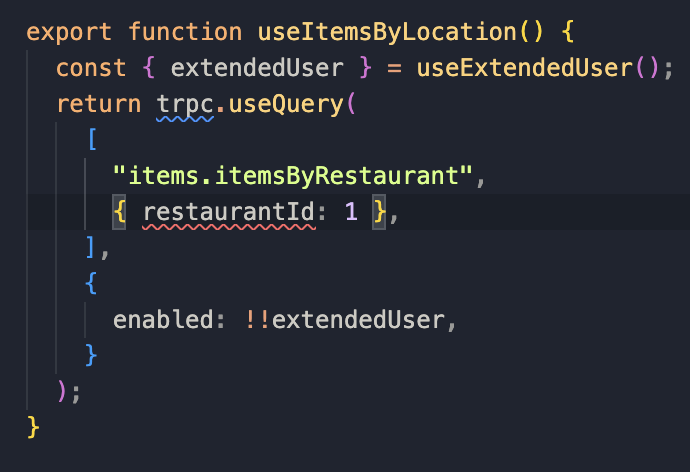
Backend In Practice
Putting all these technologies together in Mise:
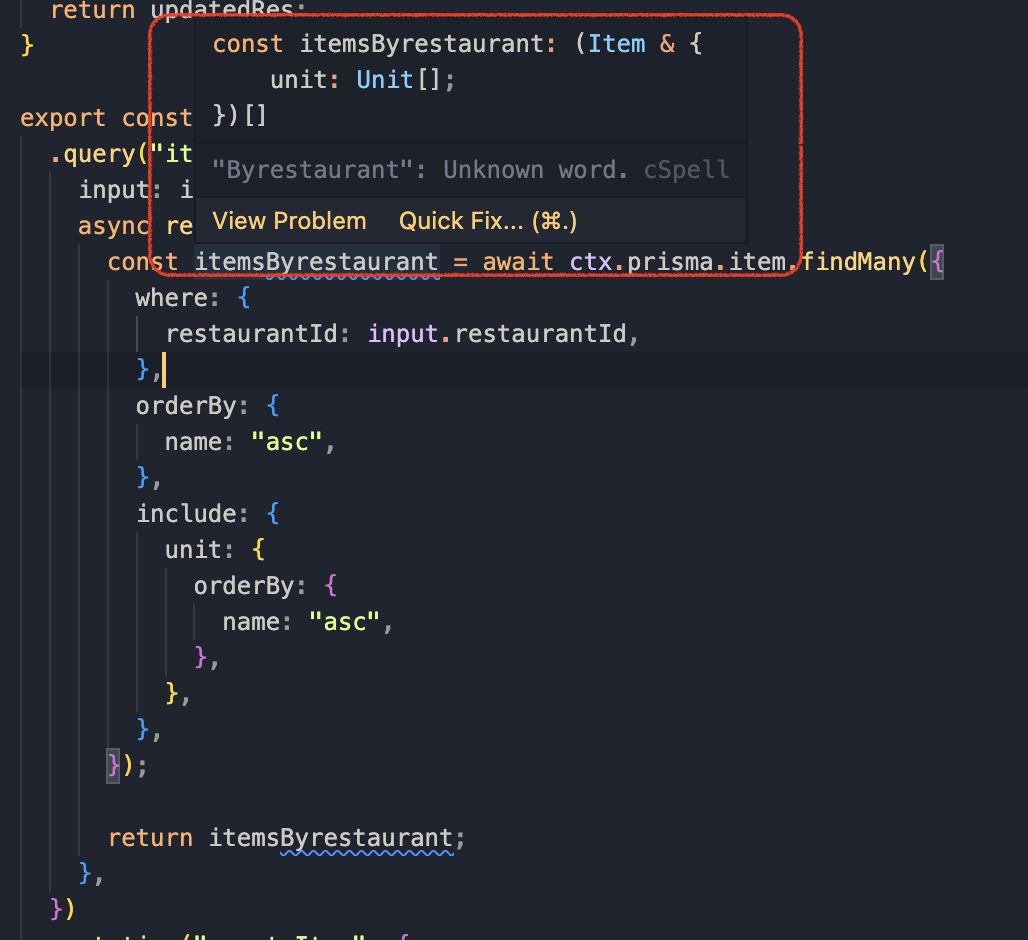
Prisma with everything typed out of the box 🚀
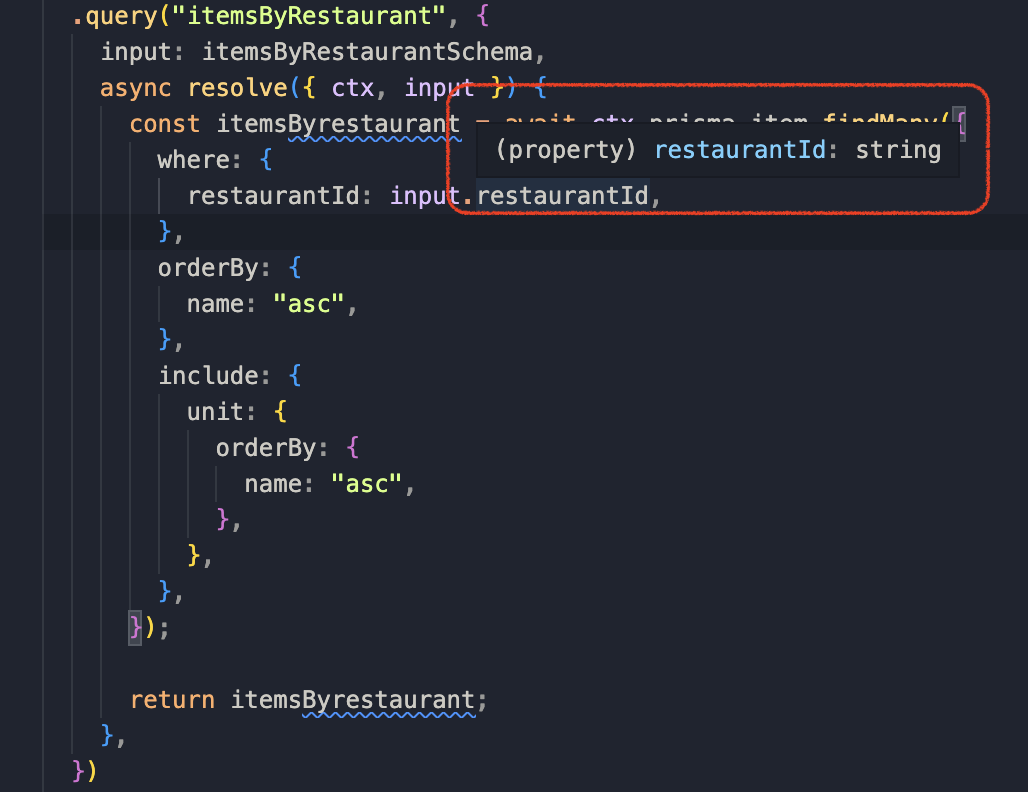
Zod typing my inputs 😎
tRPC bringing it all together seamlessly 🫡
This is the true power of TypeScript! 💥
Frontend
Since the app is behind a login, I had freedom to render on the client, server, or both. I opted for mostly client-side rendering to make it feel snappy and interactive.
I used React Query for server state, React Hook Form for form state, useState for simple UI state, and useReducer for complex state.
React Query
React Query is excellent for handling server state. When data changes, there are three strategies:
-
Invalidate queries when server data updates
- Pros: Less code.
- Cons: Potential performance issues; doesn't show instantly in UI.
-
Update cache with mutation response
- Pros: More control.
- Cons: More code; doesn't show instantly in UI.
-
Optimistic updates
- Pros: Displays instantly for a snappy experience.
- Cons: Requires rollback handling if server request fails, which can cause flashy UI behavior.
For Mise, I mostly used strategies 1 and 3. Most queries are light enough that re-fetching doesn't cause performance issues, and less code means fewer bugs—helping reliability.
React Hook Form
Large or complex forms in React often have performance issues. React Hook Form handles many forms in Mise.
The order form Kitchen Managers use is a great example:
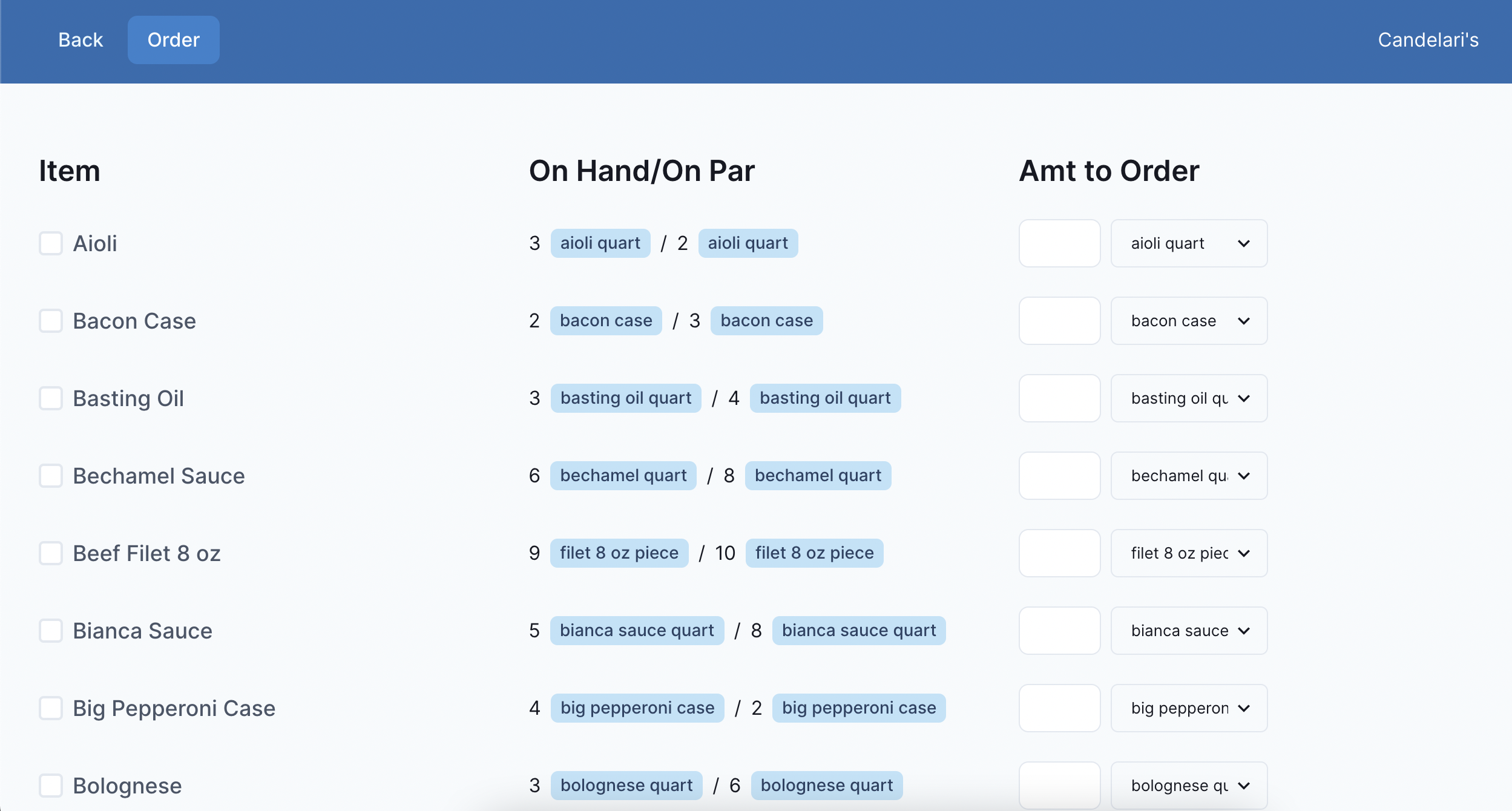
With potentially 100+ inputs, re-rendering the entire form on every change would be noticeably slow 🐢. React Hook Form avoids this by using uncontrolled inputs and only re-rendering what's necessary.
useReducer
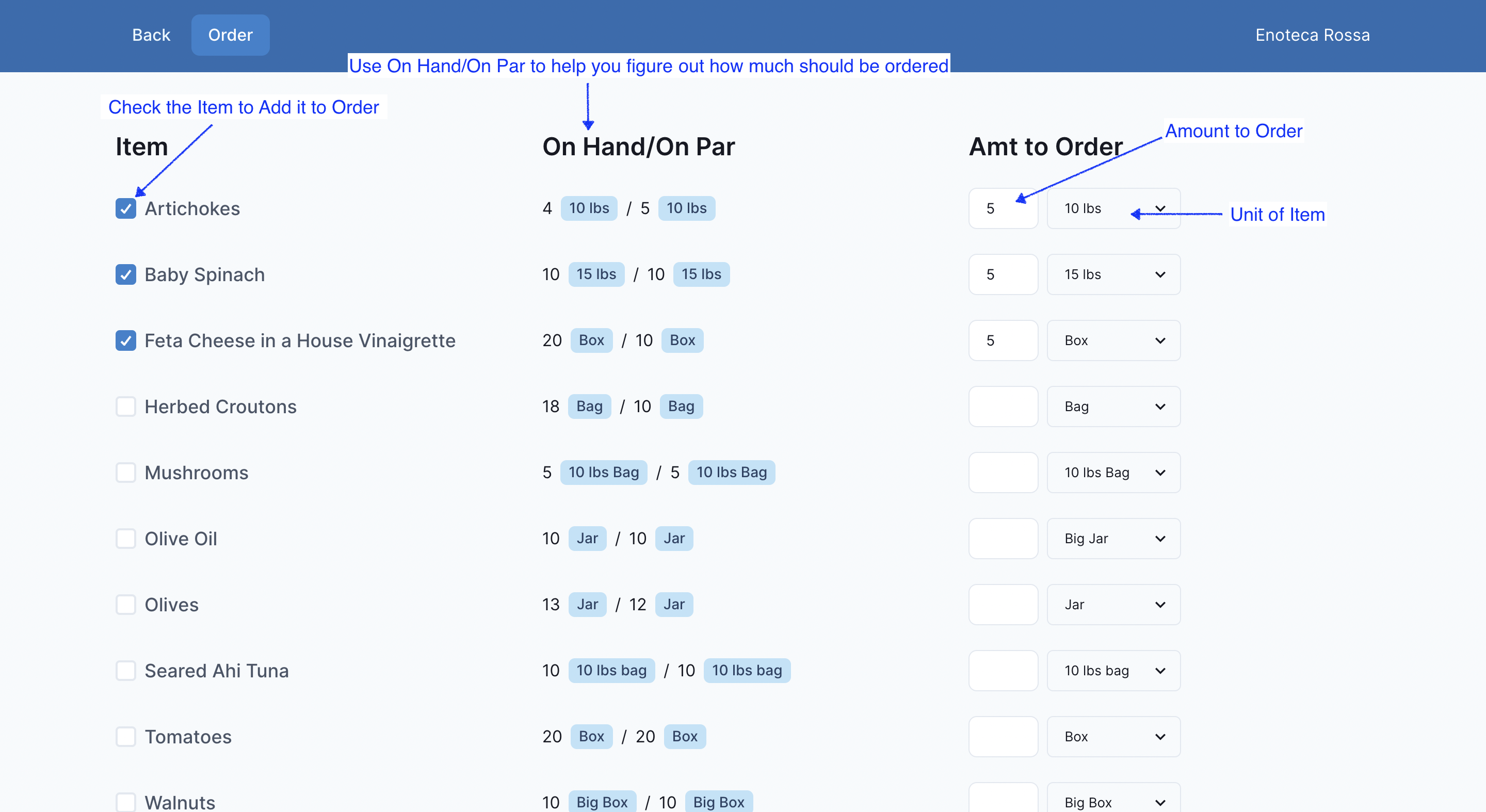
Most state in Mise is server state (React Query) or form state (React Hook Form). But I needed additional state management for the checkout feature where Kitchen Managers fill out and submit orders.
Here's what it looks like:
Ordering
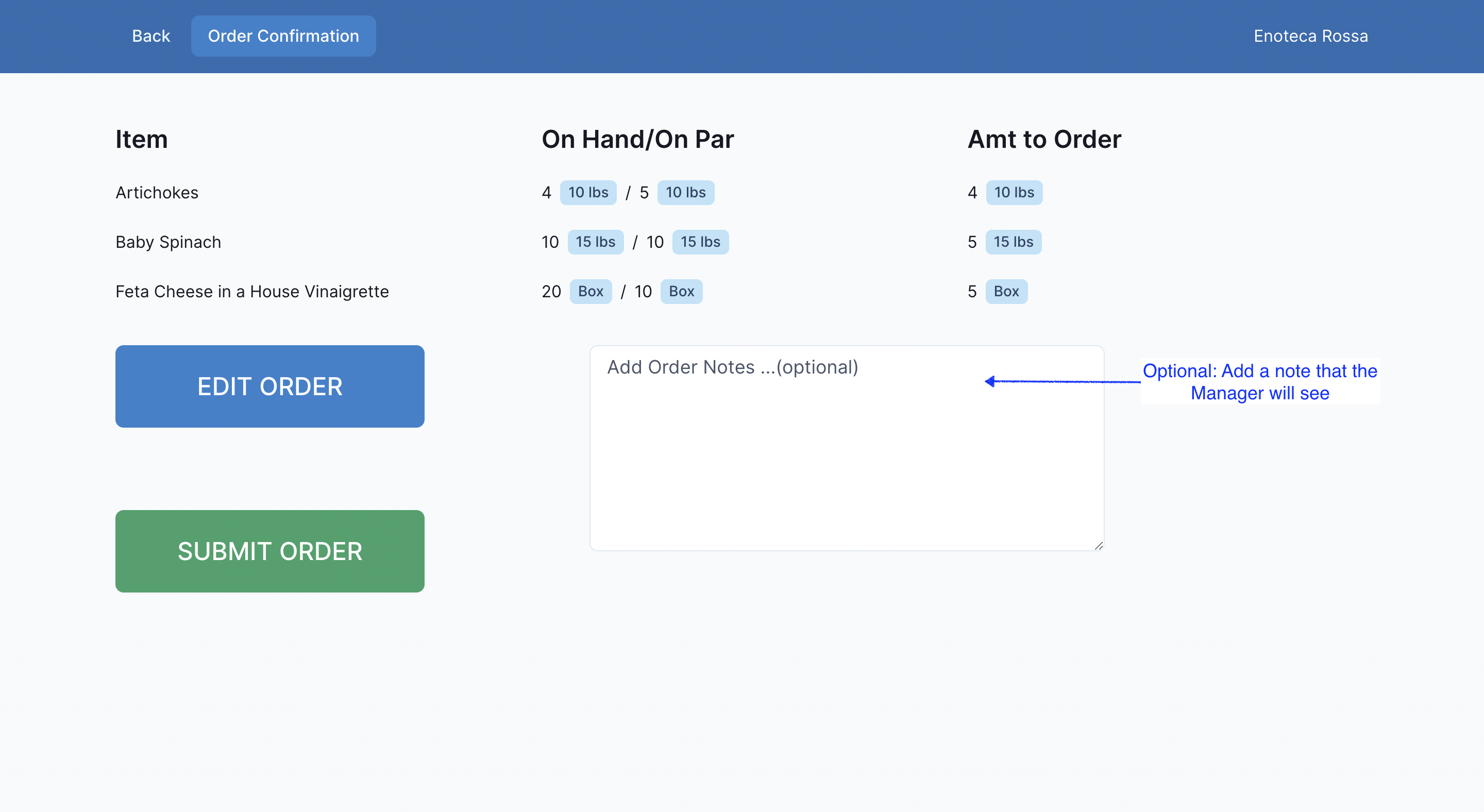
Order Confirmation
Order Success
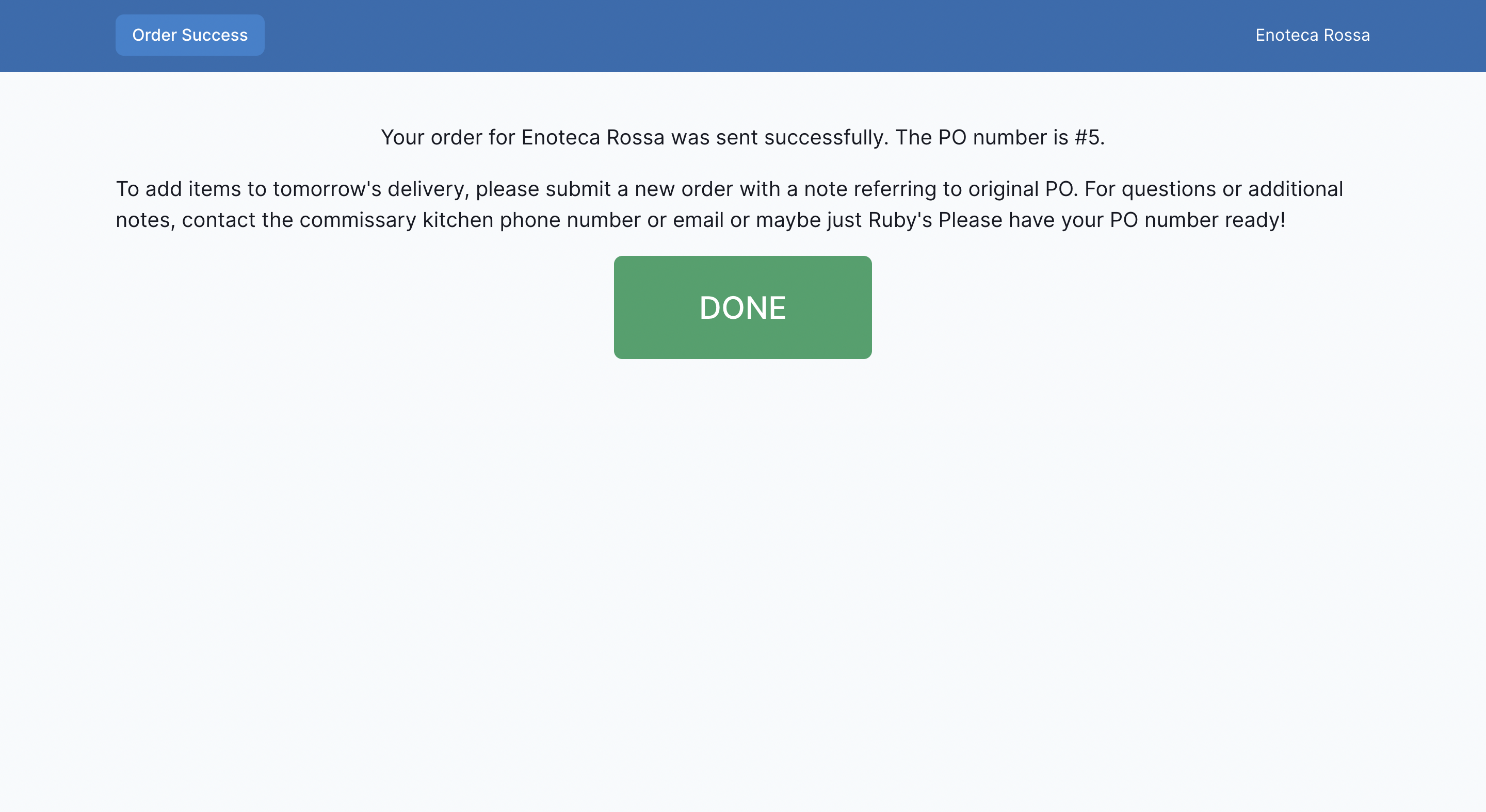
The challenge was collecting user information across different pages and representing it cohesively in state. The state needed to encapsulate:
- Form state when the user finishes selecting items
- Current step in the order flow (Ordering, Order Confirmation, Order Success)
- Order ID once created
A Flux-like store fits this use case best—it encapsulates logic in one place and handles state updates via named events:
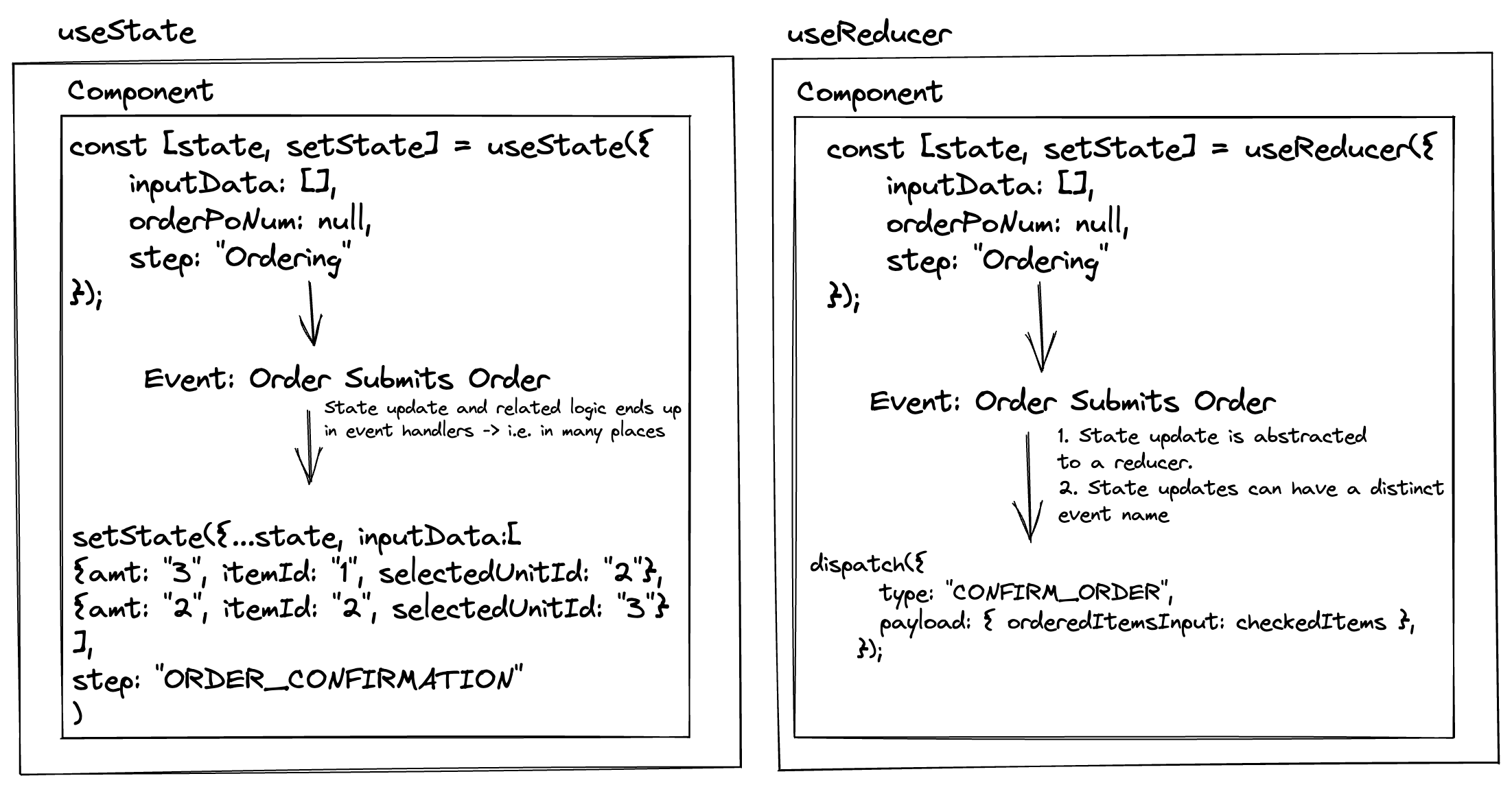
The classic useState approach would scatter state updates across multiple components without named events. I opted for a Flux-like store with useReducer.
React has many state management solutions—I like having options, each specialized for different jobs.
Jotai and Recoil looked interesting, but they provide atomic state primitives rather than the Flux pattern (store, actions, reducer) I needed.
useReducer represents Flux-like solutions such as Redux and Zustand. Zustand is often cited as having better performance than useReducer + Context, but this difference is negligible unless you have very frequent updates across many subscribers. Since users only submit orders a few times a day, performance isn't a concern. The real Zustand benefit is ergonomics (no provider, simpler API), not performance.
I narrowed my options to useReducer and XState.
XState differs from Flux-like solutions. It requires describing every possible state combination, creating a state machine:
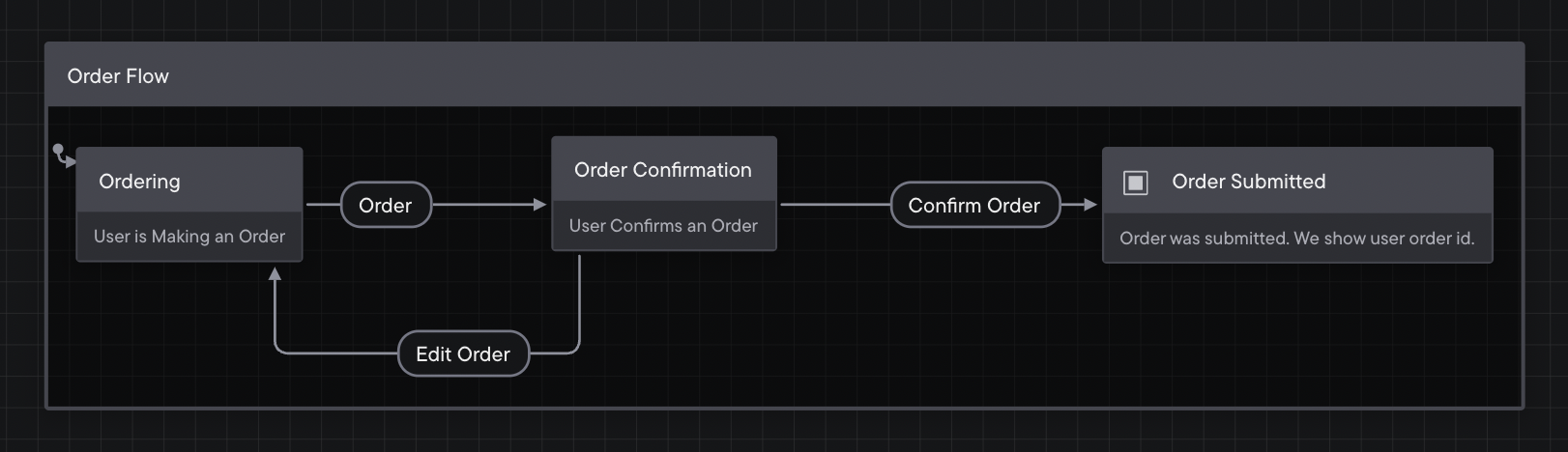 Click here for interactive version
This adds safeguards: events can only transition between specific states, not arbitrary ones. XState centralizes all logic comprehensively and provides visualization tools.
Nuance: useReducer with TypeScript discriminated unions can also prevent many impossible states at compile time—you can type your state and actions so TypeScript errors if you access invalid properties for a given state. However, useReducer doesn't provide runtime guarantees or the visual state machine tooling that XState offers.
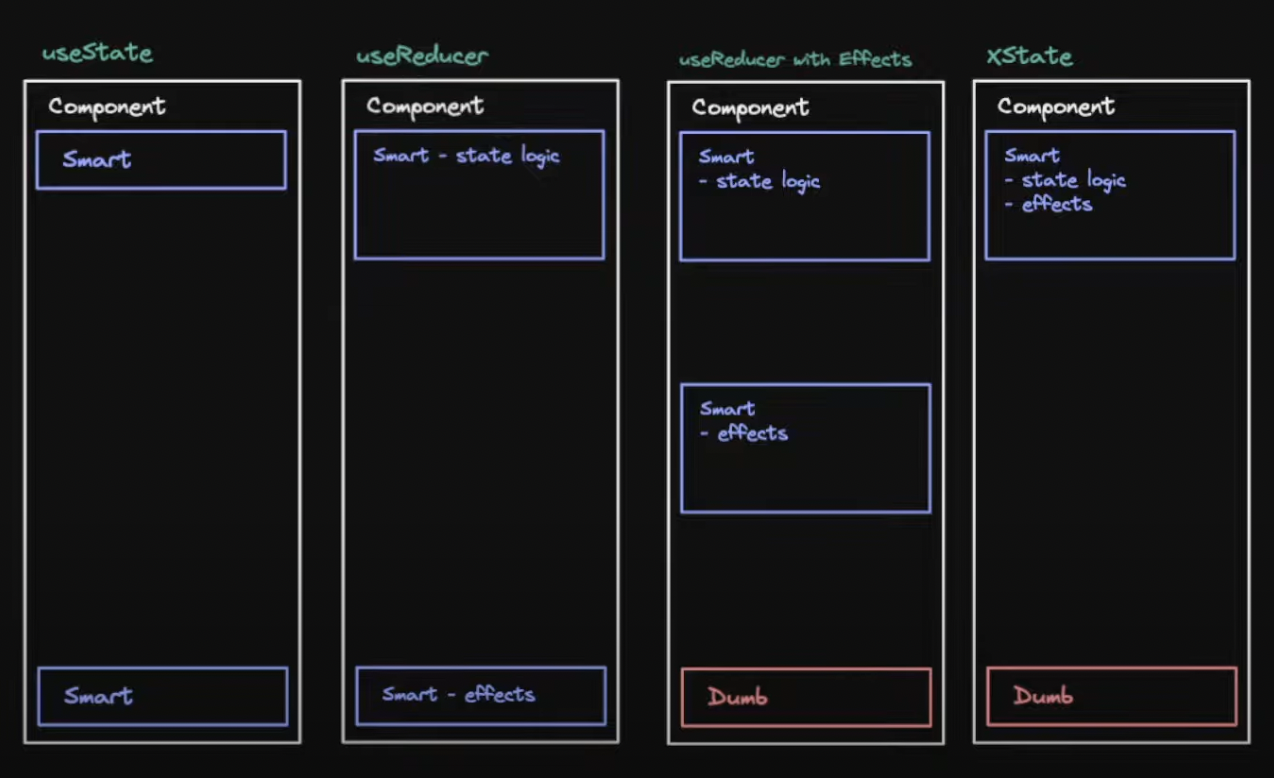 From Stately video
Weighing the pros and cons:
-
useReducer
- Pros: Lower learning curve
- Cons: Doesn't scale well; less reliable; logic mostly in one place
-
XState
- Pros: Scales well; more reliable; all logic truly in one place
- Cons: Higher learning curve
I stuck with useReducer even though XState is technically better. XState's learning curve was too steep for my time constraints. With more time, I would have used XState.
UI
I considered Chakra UI, Tailwind CSS, and Ant Design.
Ant Design is opinionated about appearance and form handling. Since I wanted React Hook Form for state management, integrating with AntD would require extra effort.
Tailwind has most of what I need. It's just CSS—minimally intrusive, framework-agnostic, and highly customizable.
Chakra UI hits the sweet spot: less opinionated than AntD, React-ready out of the box. I can copy-paste components and have working examples instantly.
Chakra UI slightly edged out Tailwind for this use case, offering the best balance of productivity and control.
Limitation acknowledged: Chakra uses CSS-in-JS (Emotion), which adds ~30-50KB to the bundle and has runtime overhead for style computation. Tailwind generates static CSS with zero runtime cost. For a "snappy and interactive" goal, Tailwind's performance advantage is relevant. I prioritized developer productivity for this internal app, but for a public-facing performance-critical app, I'd reconsider this trade-off.
Conclusion
I'm satisfied with most choices I made. They weren't perfect, but I'm proud of considering all trade-offs and making educated decisions.
Final reflection: This post emphasizes type safety for reliability, but types only catch one class of bugs. They don't catch logic errors, edge cases, or integration issues—that's what tests are for. Type safety complements testing; it doesn't replace it. For a production app, I'd invest more in testing infrastructure alongside these type-safe tools.
Mise will help Candelari's expand. Delicious things are in store 🍽.
Credits
Some thoughts in this post were inspired by: